Category: Workflow

19 posts

Standard

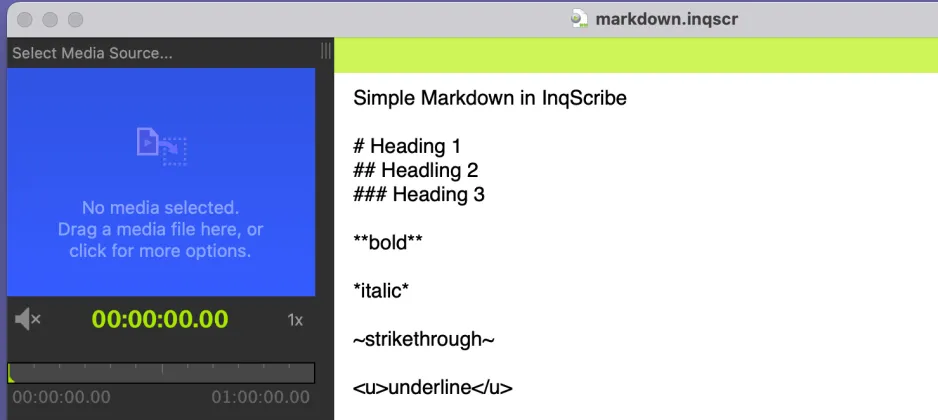
Styling Text with Markdown

One of our most requested features is text styling. Transcription services sometimes require formatting. Researchers find it helpful to use styles for coding. Writers find it useful for expression. While we have long considered adding support for text styling, we decided to keep InqScribe documents simple for a number of reasons, including performance, simplicity of…

Read more
Standard

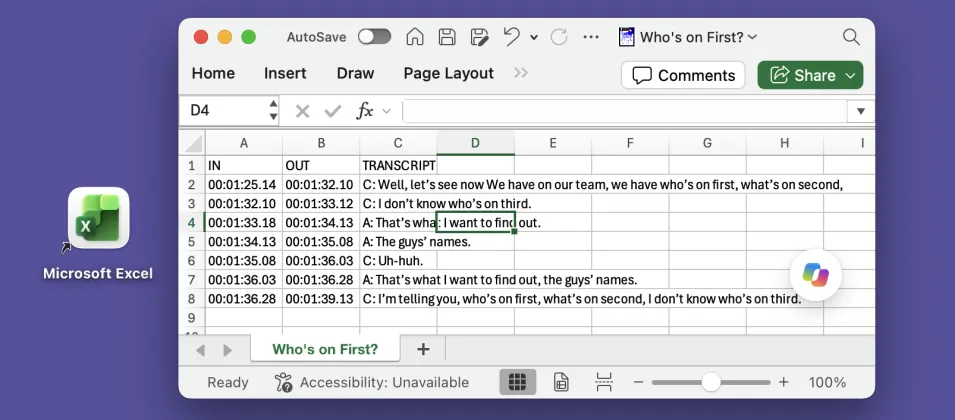
Exporting Captions to Excel

Many of our customers need to export transcripts in a structured format, with separate columns for “In” and “Out” points and speaker names. This is particularly useful for captions, especially for broadcast. One common workflow is to export an Excel spreadsheet, where each line effectively becomes a record. For example: InqScribe’s free-form edit field provides…

Read more
Standard

Guest Blog: Transcribing Spider Monkeys

Did you know you can use InqScribe to transcribe just about any language? Yes, even the language of spider monkeys. By: Sandra E. Smith Aguilar, PhD student at the Interdisciplinary Research Center for Regional Development (CIIDIR) Campus Oaxaca, of the National Polytechnic Institute (IPN) in Mexico. My research focuses on understanding the relationship between spider…

Read more
Dalit Women Fight Standard

Guest Blog: Global Collaboration Made Easy for Dalit Women Fight

The Dalit Women Fight crew uses InqScribe to translate footage for their feature-length documentary. Read about their work, and how InqScribe helps them cross language barriers. By: Thenmozhi Soundararajan, Director of Dalit Women Fight #Dalitwomenfight! Dalit Women Fight is a transmedia documentary that looks at the issue behind the rape epidemic in India: caste-based sexual…

Read more

Creating a Transcript with InqScribe and Dragon NaturallySpeaking

Update: In addition to using Dragon as described below, you can now use Apple’s Dictation feature with the InqScribe 2.5 Beta. More information here (sorry, macOS only!). --- When we’re asked about speech recognition software, it’s often from new users hoping to automate their transcription process. Although InqScribe doesn’t include any speech recognition technology, you…

Read more

Guest Blog: Using InqScribe to Record the Wabanaki Experience

Many nonprofits use InqScribe to help transcribe interviews and spread their message. In this guest blog, Rachel George explains how she came across InqScribe through her work with the Maine Wabanaki-State Child Welfare TRC. By: Rachel George, Research Coordinator The Maine Wabanaki-State Child Welfare Truth and Reconciliation Commission is charged with clarifying the experiences of…

Read more

Guest blog: A Filmmaker Uses InqScribe for Translations and Subtitles

InqScribe is popular among filmmakers for a variety of reasons. In our latest guest blog, Scott Squire shares his workflow to translate and create subtitles for his documentary. by Scott Squire, Independent Producer & InqScribe user Our movie, The Girl Who Knew Too Much is a feature documentary about women’s empowerment, the complexities of globalization…

Read more

InqScribe Tips: Format Transcripts as Tables

We often get inquiries from our users about how to format text as tables in InqScribe. Because InqScribe’s transcript window is “plain text,” it does not support tables. However, we can suggest these methods for converting InqScribe transcripts into table format. Many of our users use the Tab key to delineate columns and the Return…

Read more

InqScribe and Final Cut Pro 7: Subtitling Workflow for Filmmakers

We occasionally feature guest bloggers who can offer insights into different workflows. For the beginning documentary filmmaker, managing Final Cut Pro (FCP) workflows in a foreign language in combination with InqScribe can be daunting at first. This is why we asked Chad Braham, an experienced InqScribe and FCP user to describe his workflow in detail.…

Read more

Using InqScribe With Dropbox to Share Media With Others

InqScribe users often work collaboratively. Since InqScribe transcripts are very small files, it’s easy to share them with colleagues -- say, as an email attachment. But media files are usually huge, and unless you have access to a shared server, sharing the media files that go with your transcript can be difficult. Enter InqScribe’s Media…

Read more

Guest Blog: A Final Cut Pro Workflow for Editing in Another Language

Finding the right workflow for a project can be a challenge, especially when you have multiple languages, multiple tools, and multiple collaborators in the mix. In our latest guest blog, Chad Braham, an editor and Director of Media Production at WORDonCancer.org describes in very helpful detail how they’ve developed a translation workflow that starts in…

Read more

Guest Blog: “This is definitely the fastest transcription we’ve ever done.”

Filmmakers like InqScribe for a multitude of reasons. In this latest guest blog, part of our ongoing series highlighting how folks use InqScribe, Bongiorno Productions, an award-winning filmmaking duo, talk about how they’re using it with their latest project. Got an interesting story about how you’re using InqScribe? Please contact us at info@inquirium.net if you’d…

Read more

Taking and Sharing Notes on Video

InqScribe’s free-form text editing is intended to support a wide variety of tasks. So while we often talk of “transcribing” video, in practice oftentimes it’s more efficient to simply take notes. I was reminded of this in recent conversation with one of our customers at a cable tv network: sometimes all you want to do…

Read more

Second Language Learning Using Films

A part of our occasional series highlighting interesting uses of InqScribe In addition to transcriptionists and documentary filmmakers, researchers make up a large portion of InqScribe users. Although, in this case, we hit two of our favorite topics simultaneously: research and education. Alex Gilmore, a professor at the University of Tokyo, just published a book…

Read more

Guest Blog: How Documentary Filmmakers Transcribe and Subtitle With InqScribe

InqScribe has many different kinds of users. But the majority of our users can be categorized into three groups: university researchers, professional transcriptionists, and documentary filmmakers. To highlight how our folks are using the tool, we would like to do an occasional feature where we invite our users to be guest bloggers. Here’s our first…

Read more