
Category: Tip

32 posts

Standard

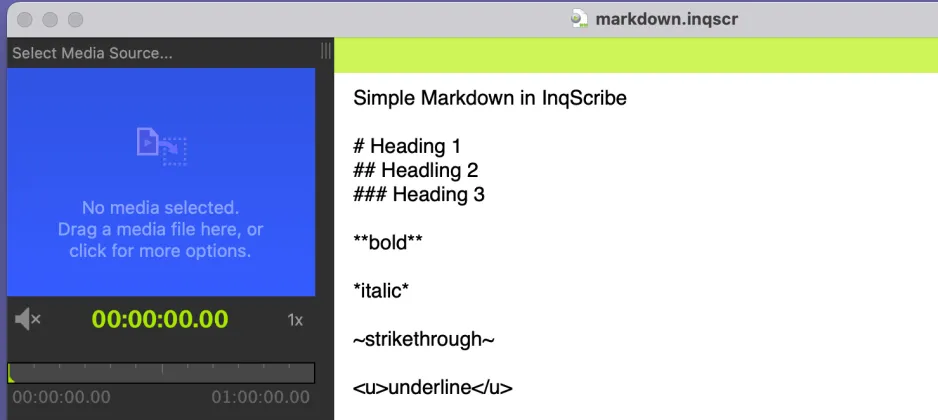
Styling Text with Markdown

One of our most requested features is text styling. Transcription services sometimes require formatting. Researchers find it helpful to use styles for coding. Writers find it useful for expression. While we have long considered adding support for text styling, we decided to keep InqScribe documents simple for a number of reasons, including performance, simplicity of…

Read more
Standard

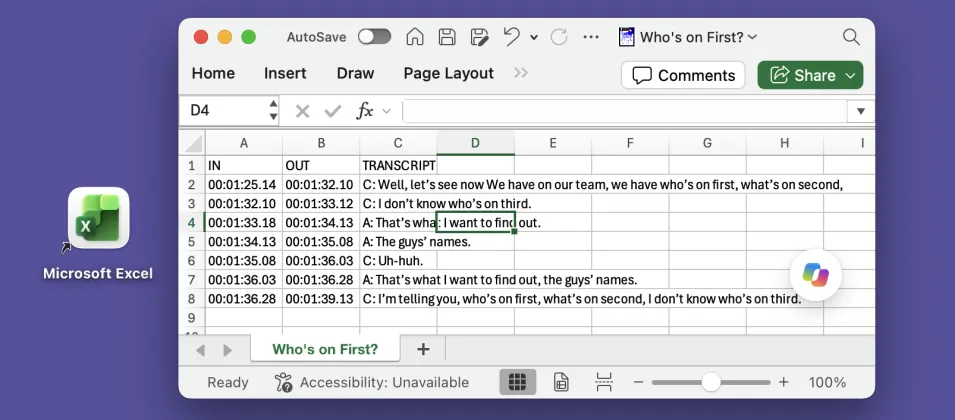
Exporting Captions to Excel

Many of our customers need to export transcripts in a structured format, with separate columns for “In” and “Out” points and speaker names. This is particularly useful for captions, especially for broadcast. One common workflow is to export an Excel spreadsheet, where each line effectively becomes a record. For example: InqScribe’s free-form edit field provides…

Read more

Working Around Discontinuous Timecodes

We often hear from users working with video that has a running timecode burned in to the video image. The most common issue is that the on-screen running timecode doesn’t match up with InqScribe’s default starting point. You can easily resolve this by running a timecode adjustment. However, you may also have a gap in…

Read more

How to Insert Quick, Marker-style Snippets

One of our users recently asked if it was possible to insert Final Cut Pro-style markers into their InqScribe transcript. Although InqScribe doesn’t support true Final Cut Pro markers yet, you can create a custom Snippet to quickly insert a short note about a video. As an example, let’s say you want to note every…

Read more

Windows QuickTime Vulnerabilities

By now, you may have heard about the security vulnerabilities posed by QuickTime for Windows. Given the security vulnerabilities, if you’re a Windows user, we highly recommend uninstalling QuickTime. What does this mean for Windows InqScribe users? You will still be able to play and transcribe most media that Windows Media Player supports. For more…

Read more

How to Convert an Audio File

Have you ever come across an audio file that won’t play in InqScribe? Although InqScribe supports a wide variety of formats (generally anything that will play in QuickTime 7 or Windows Media player 11), one day you may run into an audio file that won’t play correctly. If this happens, don’t panic, you can usually…

Read more

Speedy Shortcut Configurations

One of the easiest ways to speed up your transcription process is to setup shortcuts. You don’t have to be a professional transcriptionist to reap the benefits of quick-access commands. Whether you’re a newbie, a casual user, or aspiring to become InqScribe elite, improving your shortcut (and snippet) setup will help center your focus on…

Read more

What is a Codec Anyway?

If you work at all with digital video, you’re bound to run into issues of media compatibility. What makes a video incompatible? Will it work in InqScribe? It’s a complicated subject. In this post, we’ll explain a few key terms that should help you understand how digital video works (and sometimes, how it doesn’t work).…

Read more

How to Add Captions to Facebook Videos

As you may or may not have noticed, Facebook has been making some improvements to its video feature. Part of this campaign includes newly added support for caption/subtitle display. Now, I know what you’re thinking: “Can I use InqScribe to add subtitles to my Facebook video?” The answer: yes, yes you can. The following process…

Read more

Video Conversion Tools

Sometimes you go to transcribe your video in InqScribe only to find that InqScribe won’t play that video type. InqScribe relies on the QuickTime 7 or Windows Media Player 11 specs for media playback, and is able to play most anything that can be played in those players. But if your media is not supported…

Read more

Play a Subtitled Movie with Windows Media Player

You can easily create Subtitled QuickTime Movies directly in InqScribe, and in general we recommend using QuickTime with InqScribe. However, there is another method to play a subtitled movie by combining your video with an exported subtitle track in Windows Media Player. How you ask? Windows Media Player doesn’t natively support subtitle importation, so we’ll…

Read more

Creating a Transcript with InqScribe and Dragon NaturallySpeaking

Update: In addition to using Dragon as described below, you can now use Apple’s Dictation feature with the InqScribe 2.5 Beta. More information here (sorry, macOS only!). --- When we’re asked about speech recognition software, it’s often from new users hoping to automate their transcription process. Although InqScribe doesn’t include any speech recognition technology, you…

Read more

Guest blog: A Filmmaker Uses InqScribe for Translations and Subtitles

InqScribe is popular among filmmakers for a variety of reasons. In our latest guest blog, Scott Squire shares his workflow to translate and create subtitles for his documentary. by Scott Squire, Independent Producer & InqScribe user Our movie, The Girl Who Knew Too Much is a feature documentary about women’s empowerment, the complexities of globalization…

Read more

InqScribe Tips: Format Transcripts as Tables

We often get inquiries from our users about how to format text as tables in InqScribe. Because InqScribe’s transcript window is “plain text,” it does not support tables. However, we can suggest these methods for converting InqScribe transcripts into table format. Many of our users use the Tab key to delineate columns and the Return…

Read more

Using InqScribe With Dropbox to Share Media With Others

InqScribe users often work collaboratively. Since InqScribe transcripts are very small files, it’s easy to share them with colleagues -- say, as an email attachment. But media files are usually huge, and unless you have access to a shared server, sharing the media files that go with your transcript can be difficult. Enter InqScribe’s Media…

Read more

Keyboard Shortcuts for Film Editors

One of our customers, a professor at a film school, suggested this tip: For those of you used to using industry standard editting software like Final Cut and Avid, you can map “j”, “k”, and “l” with modifier keys to back/pause/forward. Since you need the j/k/l keys for actually inputting text during transcription, you’ll need…

Read more

InqScribe & OSX Lion: It Works!

We have done some testing of InqScribe in Apple’s newly released OS 10.7 “Lion,” and we’re continuing to do more. The good news is that everything seems to work fine in Lion, with one easy-to-address caveat. Here is our partial report: InqScribe launches in Lion and will perform the basics — video playback, timecode insertion,…

Read more

Second Language Learning Using Films

A part of our occasional series highlighting interesting uses of InqScribe In addition to transcriptionists and documentary filmmakers, researchers make up a large portion of InqScribe users. Although, in this case, we hit two of our favorite topics simultaneously: research and education. Alex Gilmore, a professor at the University of Tokyo, just published a book…

Read more

Tip: Inserting a Timecode With “Enter” Key

Problem: You want to insert time stamps in your transcript at regular intervals without having to explicitly insert a timecode. Solution 1: The easiest way to do this is to define a shortcut for your Enter key. Here’s how: 1. Open your transcript in InqScribe 2. Select the “Edit” menu->”Edit Snippets...” 3. Click the “Add”…

Read more

2.1 Tip: How to Lay Down a Timecode Every 30 Seconds

New in version 2.1 of InqScribe: You can insert timecode series, e.g. “lay down a timecode every 30 seconds,” like this: This is typically used by transcriptionists who need to sync text with the video every n seconds. So you start with an empty transcript, insert the timecodes, then begin transcription. You can insert time…

Read more

Power User Tip: Snippet Autocomplete

If you have text that you are repeatedly typing in your transcript (e.g. analysis codes, or long words), you can create snippets to insert them quickly. Here are some tips: You don’t have to assign a trigger/keyboard shortcut to snippet You can activate the trigger window with <cmd-1> (Mac) or <ctrl-1> (Windows) When the trigger…

Read more

TIP: How Can I Convert My “[00:01:23.29]” Timecodes to “00:01:23.29” (Remove Brackets)?

I have an existing InqScribe transcript that uses bracketed timecodes: I want to use unbracketed timecodes: 00:01:23.29 --- Here’s how you can do the conversion: 1. Open the existing transcript in InqScribe. 2. Select “Transcript->Transcript Settings...” from the menu bar. 3. Under the “Inserted Timecode Format:” select “00:01:23.29” from the popup menu. 4. Check the…

Read more

TIP: How to Bold Timecodes in Microsoft Word

InqScribe currently does not support bold text. However, you can use Microsoft Word’s “Find and Replace” feature to bold text. Here’s how you can do that: 1. Export your transcript to Microsoft Word. (You can just cut and paste.) 2. Select “Edit->Replace...”. 3. Click on the triangle next to the “Replace All” button to reveal…

Read more