
Category: Subtitles & Exporting

20 posts

Standard

Exporting Captions to Excel

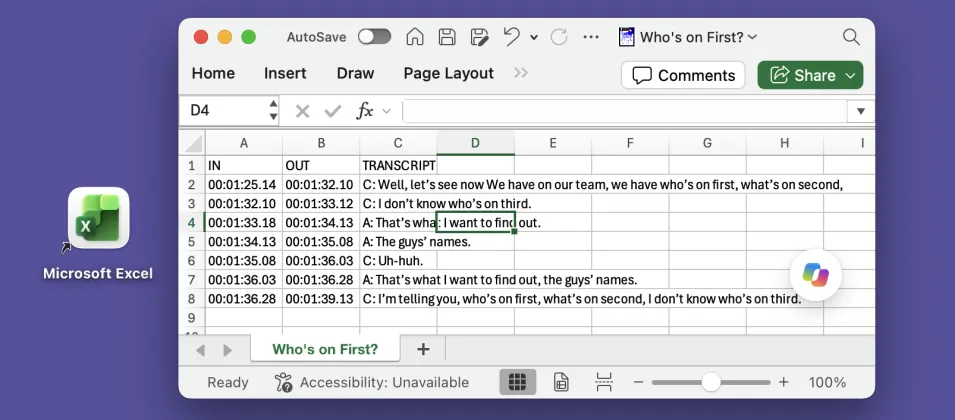
Many of our customers need to export transcripts in a structured format, with separate columns for “In” and “Out” points and speaker names. This is particularly useful for captions, especially for broadcast. One common workflow is to export an Excel spreadsheet, where each line effectively becomes a record. For example: InqScribe’s free-form edit field provides…

Read more

Using InqScribe Labs for Additional File Formats

Did you know InqScribe offers access to more export formats than what’s in the app? Our InqScribe Labs website allows you to convert your InqScribe transcript into a few extra formats. What is InqScribe Labs? InqScribe Labs is website that gives users access to experimental new features. Currently, the site houses a few commonly requested…

Read more

Vimeo: From Transcript to Subtitles

Interested in sharing your subtitles with others? Consider uploading to Vimeo. Although YouTube is the more popular option, Vimeo entices users with their clean, professional, and ad-free interface. Vimeo also offers password protected videos, which will give you more privacy control compared to YouTube. Whether you choose Vimeo or YouTube, uploading subtitles is a cinch.…

Read more

What’s the Deal with WebVTT?

As you might have noticed, InqScribe version 2.2.3 includes a new subtitle export format: WebVTT. Why should you care? Although it’s a young format, WebVTT has quickly become a new standard, supported by HTML5, YouTube, and Vimeo. Here’s a quick overview of what you can do with WebVTT: What is WebVTT? WebVTT is a text-based…

Read more

How to Add Captions to Facebook Videos

As you may or may not have noticed, Facebook has been making some improvements to its video feature. Part of this campaign includes newly added support for caption/subtitle display. Now, I know what you’re thinking: “Can I use InqScribe to add subtitles to my Facebook video?” The answer: yes, yes you can. The following process…

Read more

Play a Subtitled Movie with Windows Media Player

You can easily create Subtitled QuickTime Movies directly in InqScribe, and in general we recommend using QuickTime with InqScribe. However, there is another method to play a subtitled movie by combining your video with an exported subtitle track in Windows Media Player. How you ask? Windows Media Player doesn’t natively support subtitle importation, so we’ll…

Read more

Guest blog: A Filmmaker Uses InqScribe for Translations and Subtitles

InqScribe is popular among filmmakers for a variety of reasons. In our latest guest blog, Scott Squire shares his workflow to translate and create subtitles for his documentary. by Scott Squire, Independent Producer & InqScribe user Our movie, The Girl Who Knew Too Much is a feature documentary about women’s empowerment, the complexities of globalization…

Read more

Retiring QuickTime

When Apple released QuickTime in 1991, it was revolutionary. QuickTime provided a straightforward means to open and play a wide variety of audio and video formats. Over the years, Apple enhanced QuickTime, adding support for additional formats, subtitles, Windows support, and even a handful of interactive features. When InqScribe debuted (nearly 10 years ago!), QuickTime…

Read more

InqScribe and Final Cut Pro 7: Subtitling Workflow for Filmmakers

We occasionally feature guest bloggers who can offer insights into different workflows. For the beginning documentary filmmaker, managing Final Cut Pro (FCP) workflows in a foreign language in combination with InqScribe can be daunting at first. This is why we asked Chad Braham, an experienced InqScribe and FCP user to describe his workflow in detail.…

Read more

Guest Blog: A Final Cut Pro Workflow for Editing in Another Language

Finding the right workflow for a project can be a challenge, especially when you have multiple languages, multiple tools, and multiple collaborators in the mix. In our latest guest blog, Chad Braham, an editor and Director of Media Production at WORDonCancer.org describes in very helpful detail how they’ve developed a translation workflow that starts in…

Read more

Charity: Water

We’re proud to be sponsors of charity: water. InqScribe’s ability to support transcriptions and subtitles in multiple languages make it ideally suited for work in the field, especially for organizations such as charity: water that rely on story telling. Here’s how they describe their work: --- In 2006, we followed women in Ethiopia to a…

Read more

Guest Blog: Using InqScribe with Final Cut Pro and Multiple Languages

InqScribe’s ability to export transcripts to Final Cut Pro has made it particularly useful for documentary filmmakers working in multiple languages. In this latest guest blog, part of our ongoing series highlighting how folks use InqScribe, Carlos Sandoval, an award-winning filmmaker, talks about how they’re using it with their latest project. Got an interesting story…

Read more

Second Language Learning Using Films

A part of our occasional series highlighting interesting uses of InqScribe In addition to transcriptionists and documentary filmmakers, researchers make up a large portion of InqScribe users. Although, in this case, we hit two of our favorite topics simultaneously: research and education. Alex Gilmore, a professor at the University of Tokyo, just published a book…

Read more

Guest Blog: How Documentary Filmmakers Transcribe and Subtitle With InqScribe

InqScribe has many different kinds of users. But the majority of our users can be categorized into three groups: university researchers, professional transcriptionists, and documentary filmmakers. To highlight how our folks are using the tool, we would like to do an occasional feature where we invite our users to be guest bloggers. Here’s our first…

Read more

New InqScribe Video Tutorials

InqScribe is so easy to use, who needs tutorials, right? Well, a little background can’t hurt, so we created four new introductory video tutorials that provide (1) a basic overview of InqScribe, (2) an introduction to shortcuts and snippets, (3) tips on using timecodes, and (4) an introduction to subtitling. They’re all a part of…

Read more

Exporting NTSC DF to Final Cut Pro

There’s a bug in InqScribe 2.0.5 that affects FCP XML exporting. Currently the bug only affects exports that use XML templates that are based on NTSC DF. The bug is that InqScribe is counting the dropped frames when it converts from the timecode to a single frame count number. As a result, the converted timecodes…

Read more